
Google’s NotebookLM has introduced a new feature called Video Overviews, which transforms user-uploaded documents into narrated slide presentations using AI. This feature takes content such as PDFs, Google Docs, and images and creates a visual walkthrough complete with narration, automatically generating diagrams, charts, and quotes to help explain the material.
- It’s designed to complement the existing Audio Overviews by offering a more visual and structured way to engage with content.
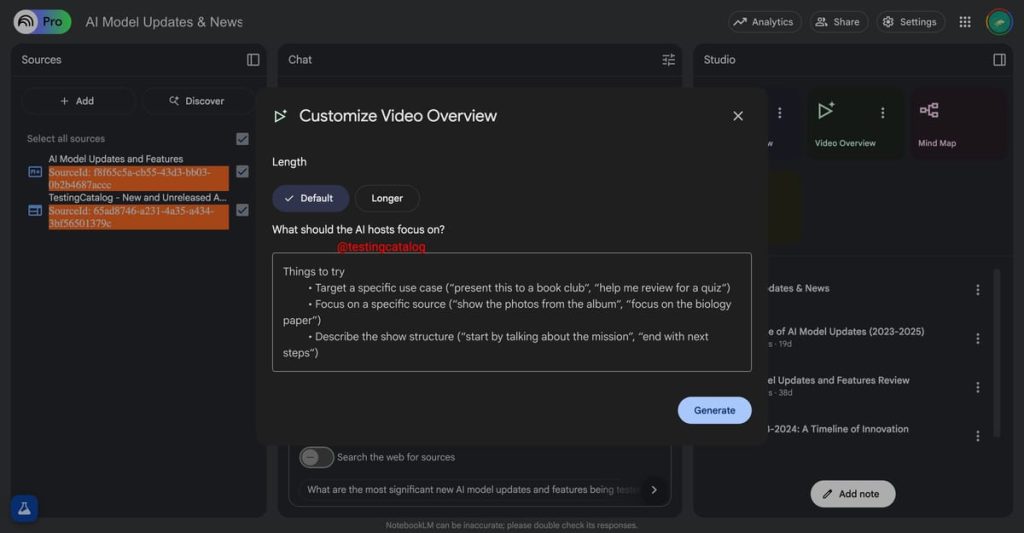
Users can tailor Video Overviews by setting the intended audience level, selecting specific learning goals, and even asking for beginner-friendly explanations or expert-level analysis. This customization allows for highly targeted presentations that are useful for education, team projects, and professional knowledge sharing.
The Studio panel within NotebookLM has also been revamped alongside this launch. It now supports multiple output types—Audio, Video, Mind Maps, and Reports—within a single notebook. The interface features clear, interactive tiles at the top for each media format and a detailed list view below, making it easier to manage and switch between different output types.
- Multitasking has also improved, allowing users to listen to audio content while interacting with visual or written summaries.
This rollout is currently available in English and will be fully deployed to all users by the week of August 4, 2025. Access is limited to users aged 18 and older. Google plans to add support for more languages in the future.
The feature is particularly beneficial for visual learners and collaborative teams, as it helps convert complex or lengthy material into shareable, engaging multimedia summaries. It allows users to regenerate content, tweak narration, adjust pacing, and change visuals—all from the same workspace.
These updates position NotebookLM as a powerful tool for transforming personal research and learning into interactive, AI-enhanced storytelling.
What are Video Overviews?
Google’s Video Overviews are AI-generated narrated slide presentations that transform documents—like PDFs, Google Docs, images, and charts—into visual walkthroughs, combining data and visuals with spoken narration.
These are designed as a visual counterpart to Audio Overviews, creating new images and diagrams while integrating quotes, metrics, and diagrams from your uploaded material to illustrate concepts effectively.
Customize Your Experience
You can specify the audience level, learning goals, topics of focus, and even ask for beginner-friendly explanations or expert-level breakdowns.
Studio Panel Upgrades
With the launch, Google also revamped the Studio panel:
- Now allows multiple output types (Audio, Video, Mind Maps, Reports) per notebook—so you can generate several Video Overviews for different topics or audiences within one project.
- Redesigned interface with clear tiles for each output at the top and a list view below.
- Improved multitasking—that means you can listen to an Audio Overview while working through a Mind Map or video overview simultaneously.
Availability & Language Support
- Rolling out in English now, with support for additional languages planned.
- Feature will reach 100% roll‑out by the week of August 4, 2025.
- Available only to users aged 18+, per Workspace policy.
Why it matters & who it’s for
- Ideal for visual learners, project teams, educators, researchers, and professionals who benefit from visuals.
- Speeds up workflow by automating the conversion of dense material into shareable, multimedia formats.
- Offers more control than traditional tools: regenerate overviews, fine-tune narration, adjust pacing, or customize visuals.
- Part of broader NotebookLM enhancements that now include public/shared notebooks, mind maps, and language-flexible audio summaries—especially useful for collaboration.
Quick Recap
| Feature | Description |
|---|---|
| Video Overviews | Narrated AI-generated slide shows that illustrate your own documents |
| Customization | Tailor the tone, format, learning level, and topics |
| Studio Panel | Create and manage multiple output types (audio, video, mind maps, etc.) |
| Availability | English rollout now; all users by Aug 2025; users must be 18+ |
| Ideal for | Visual learners, teams, educators, researchers, collab-enabled environments |